You’re driving traffic. You’re getting visits to your site, you’re getting hits to your SEO, your social ads are working well, and your dashboard is seeing a regular influx of traffic. However, there is an issue: sales numbers are flat or declining. For some store owners, this is the worst “leaky bucket” scenario. You are filling up the bucket (traffic) with water, but since there are invisible holes in the bottom, there is no increase in water in the bucket.
The typical mistakes most businesses make are their focus on raw numbers of traffic. When they have poor sales, they think more people are needed. The problem typically is in the journey the customer takes from the homepage to the “Thank You” page. That’s where the ecommerce funnel analysis comes in. Knowing where users are falling off will allow you to refocus their attention to flow. Here you’ll discover the ins and outs of funnel metrics, what ones truly matter and how to get a CRO Expert Company to help you patch up the holes and grow your bottom line.
What Is Ecommerce Funnel Analysis?
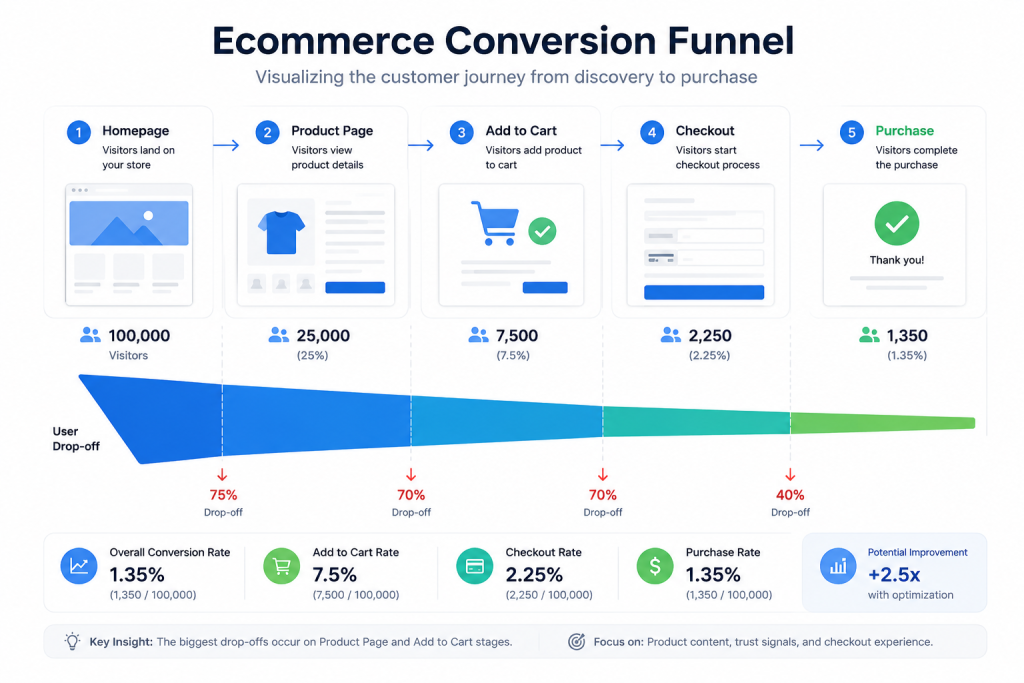
At its core, ecommerce funnel analysis is the process of mapping out the path a customer takes to make a purchase and measuring how many people move from one step to the next. Think of it as a roadmap of the buyer’s journey. In a perfect world, every person who visits your site would buy something. In reality, the “crowd” thins out at every stage, creating a funnel shape.
A typical ecommerce funnel consists of these primary stages:
- Homepage/Product Discovery: The first impression.
- Product Page: Where the user evaluates a specific item.
- Add to Cart: A signal of high intent.
- Checkout: The final hurdle (forms, shipping, and payments).
- Purchase: The successful conversion.
A Simple Example
Imagine your store has the following data over a month:
- 10,000 visitors (Top of funnel)
- 2,000 product page views
- 500 add-to-carts
- 80 purchases (Bottom of funnel)
By looking at these numbers, you can see that you lose 80% of your audience before they even see a product, but you retain 16% of those who add to their cart. This data tells you exactly where to focus your Conversion Optimization process in this case, getting more people from the homepage to the product pages.
Why Funnel Analysis Is Important for Ecommerce Stores
Without funnel analysis, you are essentially flying blind. You might see that your “Shopify conversion rate is low,” but you won’t know why. Funnel analysis provides the “why” behind the “what.”
By analyzing the funnel, you can:
- Reduce Cart Abandonment: Pinpoint if users are leaving because of unexpected shipping costs or a complex checkout.
- Improve Marketing ROI: Stop wasting ad spend on pages that don’t convert.
- Increase Average Order Value (AOV): Identify opportunities for upsells when users are most engaged.
- Understand User Intent: Distinguish between “window shoppers” and “ready-to-buy” customers.
Most users searching for funnel insights are looking for answers to specific frustrations: “Why are visitors not buying?” or “Why are users leaving at the final payment step?” Funnel analysis transforms these questions into actionable data points, often starting with a comprehensive website conversion audit.
Key Stages of an Ecommerce Conversion Funnel
Awareness Stage
This is where the relationship begins. Users find you through organic search, paid ads, or social media referrals. At this stage, you should track your Click-Through Rate (CTR) and Bounce Rate. If people land on your site and immediately leave, your messaging likely doesn’t match their expectations.
Product Discovery Stage
Once they are on the site, can they find what they want? High drop-offs here usually signal poor navigation, slow loading times, or confusing category layouts. Implementing conversion-focused UX design ensures that the path from the “Home” to “Category” to “Product” is seamless and intuitive.
Add-to-Cart Stage
When a user clicks “Add to Cart,” they’ve moved from browser to lead. If this rate is low, ask yourself, Is the price clear? Are there trust issues? Is the CTA button hidden? Sometimes, something as simple as adding a “Free Shipping” badge near the button can skyrocket this metric.
Checkout Stage
The checkout is the most sensitive part of the funnel. It’s where “buyer’s remorse” or frustration kicks in. Common friction points include forced account creation, long forms, and a lack of preferred payment methods. This stage requires surgical precision to ensure nothing distracts the user from finishing the transaction.
Purchase & Retention Stage
The funnel doesn’t end at the sale. The post-purchase experience dictates whether a customer becomes a one-time buyer or a brand advocate. Tracking repeat purchase rates and email engagement for loyalty programs is key to long-term growth.
Important Metrics to Track in Funnel Analysis
To master the funnel, you need to speak the language of data. Here are the non-negotiables:
- Conversion Rate: The “North Star” metric. The percentage of total visitors who complete a purchase.
- Cart Abandonment Rate: The percentage of users who add items to their cart but leave without buying. High rates here suggest friction in the transition to checkout.
- Checkout Completion Rate: This focuses purely on the checkout flow. If it’s low, your forms are likely too long or your payment gateway is glitchy.
- Bounce Rate: If this is high, your landing pages aren’t relevant to the traffic you’re attracting.
- Funnel Drop-Off Percentage: This measures the “leakage” between any two specific steps. It is the most direct way to identify barriers.
Tracking these metrics effectively often requires a deep dive into google analytics for cro to ensure your data is clean and segmented.
How to Perform Ecommerce Funnel Analysis Step by Step
Performing a funnel analysis might sound like something reserved for data scientists, but it is actually a very logical, step-by-step process. Think of it as a health checkup for your website. You are looking for the “clogged arteries” where customers are getting stuck.
Here is how you can perform your own analysis, even if you are just starting out:
Step 1 — Define Your Funnel Stages
Before looking at numbers, you need to map out the journey. Every store is different, but most follow a standard path. Write down the specific pages a user must visit to buy. For example:
- Landing Page (Home or Category)
- Product Page (Viewing the details)
- Cart (Reviewing the selection)
- Checkout (Entering info)
- Success Page (The “Thank You” screen)
Step 2 — Set Up Funnel Tracking
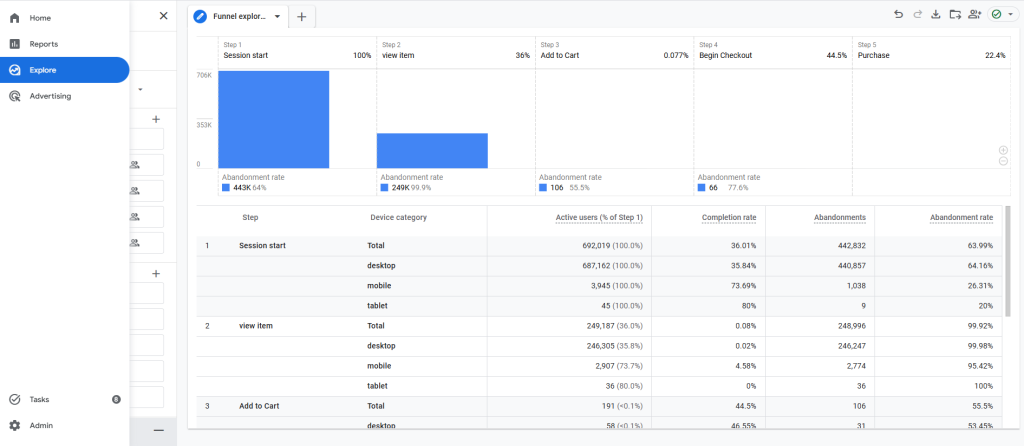
Once you know the steps, you need a tool to count the people at each one. Most beginners use Google Analytics 4 (GA4). Within GA4, you can use the “Explore” tab to create a “Funnel Exploration.” You simply tell the tool which URLs correspond to the steps you defined in Step 1. Setting up a proper ga4 conversion tracking setup is the most important part of this phase—if your tracking is off, your data will lie to you.
Step 3 — Analyze User Drop-Offs (Finding the "Cliff")
Now, look at your visual funnel. You will see a bar chart where each bar gets smaller. Look for the biggest “drop.”
- Imagine you have 1,000 people on the Product Page but only 10 click “Add to Cart,” you have a 99% drop-off rate at that stage.
- This tells you the problem isn’t your checkout; it’s likely your product descriptions, images, or pricing.
Step 4 — Identify Conversion Barriers
Once you find where they are leaving, you have to figure out why. Put on your “detective hat” and look for barriers like:
- Technical Issues: Does the page load slowly on mobile?
- Psychological Issues: Are there no customer reviews to build trust?
- Functional Issues: Is the “Checkout” button hard to find?
- Financial Issues: Are you surprising them with high shipping costs only at the very end?
Step 5 — Test and Optimize
Don’t try to fix everything at once. Pick the stage with the biggest drop-off and make one change. For example, if people are leaving the cart, try adding a “Money Back Guarantee” badge. Use A/B testing to see if your change actually helps. This structured Conversion Optimization process ensures that you are making decisions based on facts, not just “gut feelings.”
Funnel Problems and How to Fix Them
|
Problem |
Potential Fix |
|
High Product Page Exit |
Use high-quality zoomable images, add social proof (reviews), and include an FAQ section. |
|
Low Add-to-Cart Rate |
Make the “Add to Cart” button a high-contrast color and place it “above the fold.” |
|
Checkout Abandonment |
Enable Guest Checkout, offer Apple/Google Pay, and show a progress bar. |
|
Poor Mobile Performance |
Optimize for “thumb-friendly” navigation and ensure pages load in under 2 seconds. |
Best Tools for Ecommerce Funnel Analysis
You don’t need to be a data scientist to do this. These tools make it accessible:
- Google Analytics 4 (GA4): The industry standard for funnel visualization and google analytics for cro.
- Hotjar / Microsoft Clarity: These provide heatmaps and session recordings so you can see how users move their mouse and where they get stuck.
- Shopify Analytics: Great for a high-level overview of store health.
- Looker Studio: Excellent for creating custom dashboards that combine data from multiple sources.
Funnel Optimization Tips That Increase Ecommerce Conversions
If you want to see an immediate impact, focus on these UX wins:
- Simplify Navigation: Don’t overwhelm users with 50 menu items.
- Use Trust Badges: Display SSL certificates and “Secure Payment” icons near the checkout button.
- Optimize Mobile Experience: Over 70% of ecommerce traffic is mobile. If your mobile site is just a “shrunken” version of your desktop site, you’re losing money.
- Reduce Checkout Friction: Every extra form field reduces conversion by a measurable percentage. If you don’t need their phone number, don’t ask for it.
By implementing conversion-focused UX design, you aren’t just making the site look better you’re making it easier for people to give you their money.
Turn Funnel Data Into More Ecommerce Sales
Funnel analysis is not a one-off task, it’s an ongoing process of listening to what your users are saying with their behavior. There’s no need to have a million dollar budget to get started. Any improvement in one step of your funnel can make a compound increase in revenue, such as optimizing page speed or simplifying shipping terms.
Don’t guess why you don’t have the sales you want. Follow the path and identify the friction and locate the leaks. When you get better funnel insights, you make better decisions, you have happier customers and you have a healthier bottom line. So now it’s time to look at your data, where your next major growth opportunity lies in the middle of your funnel.