As a Shopify merchant, you’re aware that each click, each cart add, and each conversion directly affects your bottom line, as a Shopify merchant. Good ecommerce tracking isn’t something you can go without – it’s essential to growing your business.
Google Analytics 4 for Shopify, which is based on Google’s event-driven data model, allows you to dig deep data-driven insights into your store’s performance so you can stop making educated guesses and start making data-informed decisions. But, not every data is a cake for making profit-driven strategy.
Maybe you’ve already done your ga4 conversion tracking setup but are you taking advantage of that data to grow? You are now about to make a huge leap. You’ll learn about:
- The Core Shopify GA4 Metrics: The specific metrics you need to keep an eye on to check on your store’s monetary well-being.
- Ecommerce Funnel Analysis: How to get an accurate view of the exact timeframes during which users lose interest in a product and move on to the next one.
- Engagement & Behavior Tracking: Understanding user intent and improving your website’s search and landing pages.
- Actionable Optimization: How to correlate GA4 metrics for Shopify with advanced tactics that can dramatically increase your ecommerce conversion rates?
So, here we go and let’s unleash the potential of GA4 ecommerce tracking on Shopify!
Why GA4 Ecommerce Tracking on Shopify is Non-Negotiable
While Shopify provides an excellent, user-friendly native dashboard, relying solely on it to scale your business is like trying to navigate a ship with only a compass and no radar. Shopify’s native analytics are fantastic for a quick health check showing you total sales, top products, and basic conversion rates. However, they lack the granularity needed to understand why users behave the way they do before making a purchase.
This is where GA4 steps in. Unlike the older Universal Analytics, which relied heavily on session-based data, Google Analytics 4 operates on an event-driven data model. Every single interaction whether it’s a page view, a click, a scroll, or a purchase is recorded as an independent event.
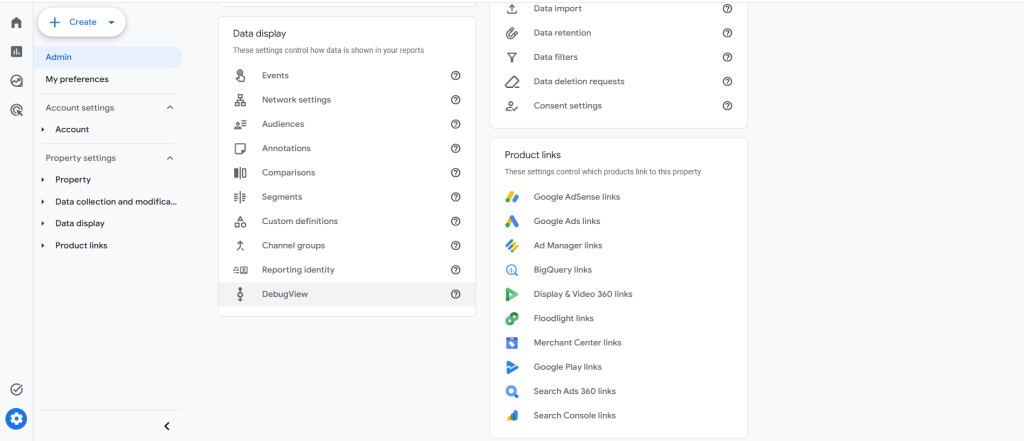
Process: How to Verify Your GA4 Events are Firing Correctly
Before analyzing data, you must ensure your tracking is live and accurate. Follow these short steps:
- Open DebugView: In GA4, navigate to Admin→ Data Display → DebugView.
- Trigger a Session: Open your Shopify store in a new incognito window.
- Simulate a Journey: Click a product, add it to the cart, and proceed to checkout.
- Check the Stream: Look back at GA4’s DebugView timeline to confirm real-time events like view_item and add_to_cart are populating without delays.
By monitoring these advanced Shopify analytics metrics, you can shift your strategy from guesswork to precision engineering, fixing leaky buckets in your marketing funnels.
Core Funnel Metrics: Tracking the Shopify Buyer’s Journey
To optimize an ecommerce store, you must view your customer journey as a sequential pipeline. Users progress through specific behavioral milestones, which GA4 tracks through standardized ecommerce events.
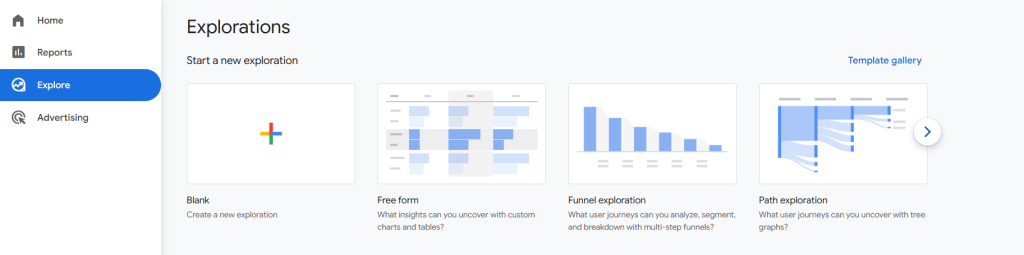
Process: How to Build an Ecommerce Funnel Exploration Report in GA4
To visualize these core milestones together, build a custom funnel report following these steps:
- Navigate to Explore: In GA4, click the Explore tab in the left menu and select a Blank exploration.
- Choose Technique: Change the technique dropdown from Free Form to Funnel Exploration.
- Define Your Steps: Click the pencil icon next to “Steps” and add your sequence:
- Step 1: view_item (Product page view)
- Step 2: add_to_cart (Cart addition)
- Step 3: begin_checkout (Checkout started)
- Step 4: purchase (Order completed)
Apply: Click Apply to view your drop-off rates across the entire journey.
A. Item Views (view_item)
The view_item event triggers every time a user lands on a Product Detail Page (PDP).
- Why it matters: If you have high overall traffic to your store but low view_item counts, your collection pages or homepage navigation may be confusing.
B. Add to Cart & Cart-to-Detail Rate
The add_to_cart event measures how many times a user clicked your “Add to Cart” or “Buy Now” button. To get a true sense of performance, monitor your Cart-to-Detail Rate.
- Why it matters: A low Cart-to-Detail rate usually signals a problem on the product page itself (e.g., poor images, high pricing, hidden shipping costs).
- Optimization Tip: If you notice your cart-to-detail rate slipping below industry benchmarks (typically 5% to 10%), consulting a professional CRO Expert Company can help you run targeted A/B tests to eliminate these friction points.
C. Checkout Initiation (begin_checkout)
The begin_checkout event tracks the moment a user moves into the actual checkout sequence.
- Why it matters: This metric bridges intent and action, quickly isolating cart abandonment issues before the payment step.
Revenue & Conversion Metrics Every Shopify Store Owner Needs
Once you understand how users navigate your funnel, you need to track the financial health of those interactions using GA4’s standard ecommerce reports.
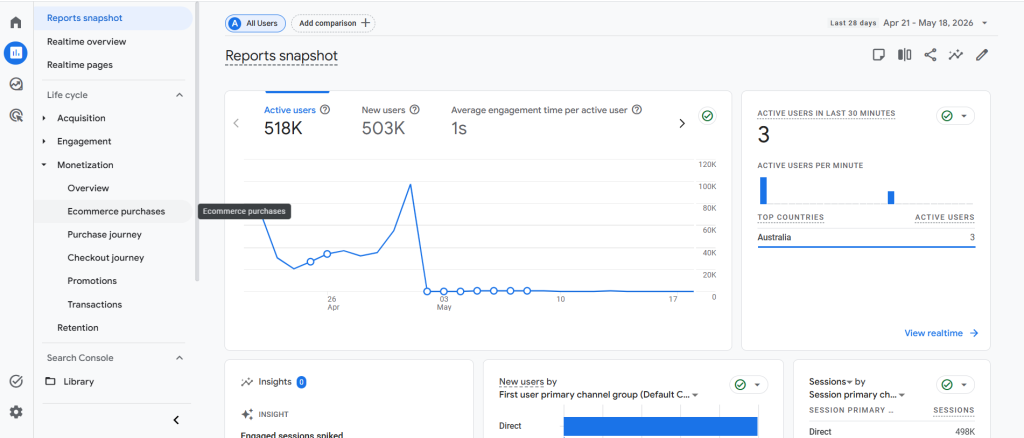
Process: How to Access and Analyze Revenue in GA4
- Open Reports: Navigate to Reports → Monetization → Ecommerce purchases.
- Isolate Products: Check the table to review Item revenue, Item purchase quantity, and Purchase conversion rate sorted by individual product names.
- Compare with Shopify: Cross-reference these monthly numbers with your Shopify dashboard to identify any tracking gaps.
A. Purchase Revenue vs. Total Revenue (purchase)
When a user successfully completes a transaction on Shopify, the purchase event is fired.
- Why it matters: Ensure your reporting filters are configured correctly so your marketing attribution is based on actual product revenue rather than inflated totals containing local sales tax and shipping fees.
B. Ecommerce Conversion Rate
In GA4, conversion rates can be viewed as User Conversion Rate (unique buyers) or Session Conversion Rate (total visits resulting in a purchase).
- Why it matters: This is your ultimate benchmark of commercial efficiency. Keeping a close eye on your GA4 conversion rate ensures you are measuring success against a clean, unified standard.
C. Average Order Value (AOV)
Average Order Value measures the average dollar amount spent every time a customer places an order. Tracking how your AOV fluctuates alongside specific promotional bundles helps you determine your most profitable items.
Engagement & User Behavior Metrics
While financial metrics tell you what happened, engagement metrics give you a window into user psychology, showing whether visitors are genuinely interacting with your Shopify store.
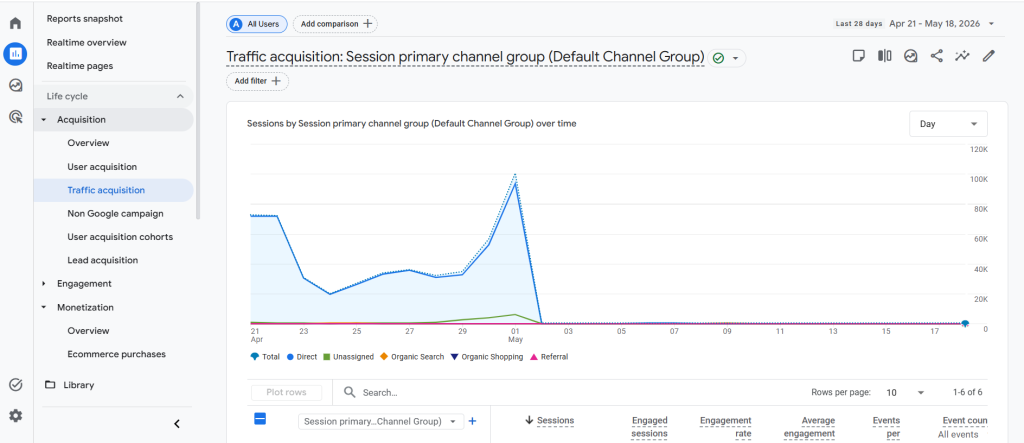
Process: How to Track and Optimize for Low Engagement Rates
- Identify the Problem: Go to Reports → Acquisition → Traffic Acquisition and look at the Engagement Rate column for each traffic channel.
- Filter Low Performers: Identify channels dropping below a 40% engagement rate.
- Audit Landing Pages: Audit the specific landing pages associated with those low-performing channels to fix page-speed bottlenecks or layout issues.
A. Engaged Sessions & Engagement Rate
In GA4, the outdated “Bounce Rate” metric has been replaced by Engagement Rate. A session is considered “engaged” if it lasts longer than 10 seconds, includes 2 or more page views, or triggers at least one conversion event.
B. On-Site Search Tracking (view_search_results)
If your Shopify store features a search bar, GA4 can automatically track what search terms your customers are typing via the view_search_results event.
Why it matters: This provides direct insight into customer intent, handing you a clear blueprint for your next inventory expansion or search-tagging update.
Advanced Optimization: Turning GA4 Metrics into Higher Sales
Data is only as valuable as the actions you take because of it. Once your GA4 metrics for Shopify pinpoint exactly where your conversion leaks are occurring, the next step is combining this quantitative data with qualitative insights.
Process: How to Combine GA4 Data with Heatmaps for Optimization
- Find the Leak: Review your GA4 Funnel Exploration report and locate the page with the highest drop-off rate (e.g., the Cart page).
- Deploy Visual Tracking: Log into your session recording tool to learn How to use heatmaps for Shopify on that specific URL.
- Analyze User Behavior: Filter session recordings by “Users who abandoned cart” and watch their interactions to find out why they left (e.g., broken buttons or confusing form fields).
- Fix and Measure: Implement design fixes on Shopify, then check GA4 the following week to see if the drop-off rate decreases.
This endless process of gathering, analyzing and testing data can become a full-time occupation if the retail business is headed for a full-scale campaign of growth. Using a certified google analytics for cro strategy means that you can track all events, even custom clicks and upsell acceptances. However, if your internal team don’t have the capacity to continuously break down these technical reports, it may be helpful to hire a dedicated agency that offers in-depth cro audit services to break through raw data points into design changes that will lead to sustained revenue.
Conclusion & Checklist
For today’s ecommerce merchants, the ultimate competitive edge is mastering Google Analytics 4 for Shopify. You can keep a close eye on the revenue metrics, understand what’s going on with your customers on your site, and ensure you’re proceeding with the right metrics when it comes time to scale your store, as you will have the exact numbers you need.
Take a look at your data tracking today. Check your GA4 property, by building a custom conversion path exploration report, and ensure that you’re collecting clean, accurate data for your events. Your Shopify store’s metrics contain stories that can help you make the next leap in your growth curve.