You’ve done the hard work. You’ve done the SEO, figured out your advertising budget, and gotten your site and your ad campaign to draw in quality people. Then of course, the dreaded moment arrives, someone puts a gorgeous product in their cart, clicks “Checkout” and nothing happens. They vanish. This is what Shopify cart abandonment looks like and if you’re experiencing it regularly, you’re not the only one. According to the industry statistics, almost 70% of online shopping carts get abandoned before the purchase is completed.
If you’re a Shopify store owner, these “almost-sales” are a big revenue drain in your revenue bucket. Each lost cart is a lost chance to expand the brand and get your acquisition costs back. Fortunately, fighting abandonment is not a matter of chance but one of recognizing friction points and eliminating the obstacles to purchase. This guide gives you a solution-oriented, actionable reduction of cart abandonment on Shopify and convert window shoppers into loyal customers on Shopify by our Ecom CRO Expert.
Why Shopify Cart Abandonment Happens
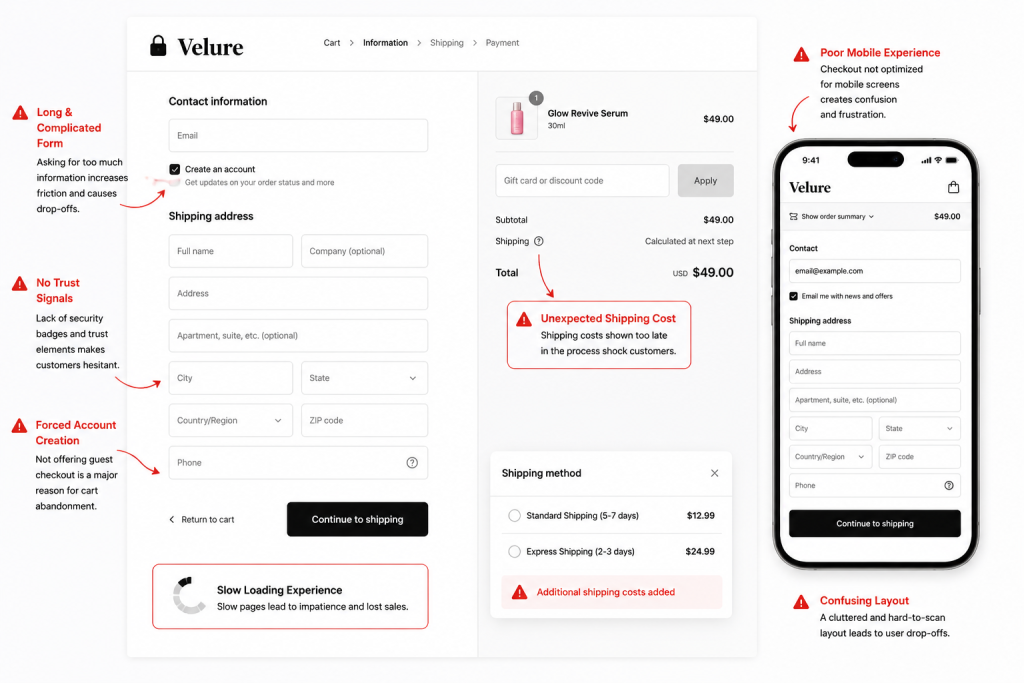
You can’t fix leaks without first locating them. People don’t leave for no reason. There are several common mistakes that lead to the Shopify checkout mistakes:
- Unexpected Costs: The #1 conversion killer is discovering too late what the shipping cost or the taxes will be.
- Forced Account Creation: Fast shopping is a modern consumer expectation – no one wants to have to type a password just to purchase a t-shirt.
- Complex Checkout: Too many form fields or pages causes “decision fatigue.
- Lack of Trust: Your site will appear amateurish if there is no security badge.Users will not give credit card details if it doesn’t look professional or if there is no security badge.
- Technical Friction: We all experience a “forget it” moment when things take too long to load on a mobile or the payment is not as straight forward.
1. Simplify Your Shopify Checkout Process
To reduce cart abandonment on Shopify, you must make the checkout process as invisible as possible. Every extra field is a hurdle.
- Enable Guest Checkout: Never require an account. You can always ask them to save their info after they’ve paid.
- Reduce Form Fields: Use “Address Autocomplete” (native to Shopify) to save users from typing.
- One-Page Checkout: Shopify’s modern checkout is streamlined, but ensure you aren’t adding unnecessary custom blocks that clutter the view.
- Progress Indicators: If you use a multi-step checkout, show a clear “Step 1 of 3” bar so the user knows the finish line is close.
2. Optimize Your Store for Mobile Users
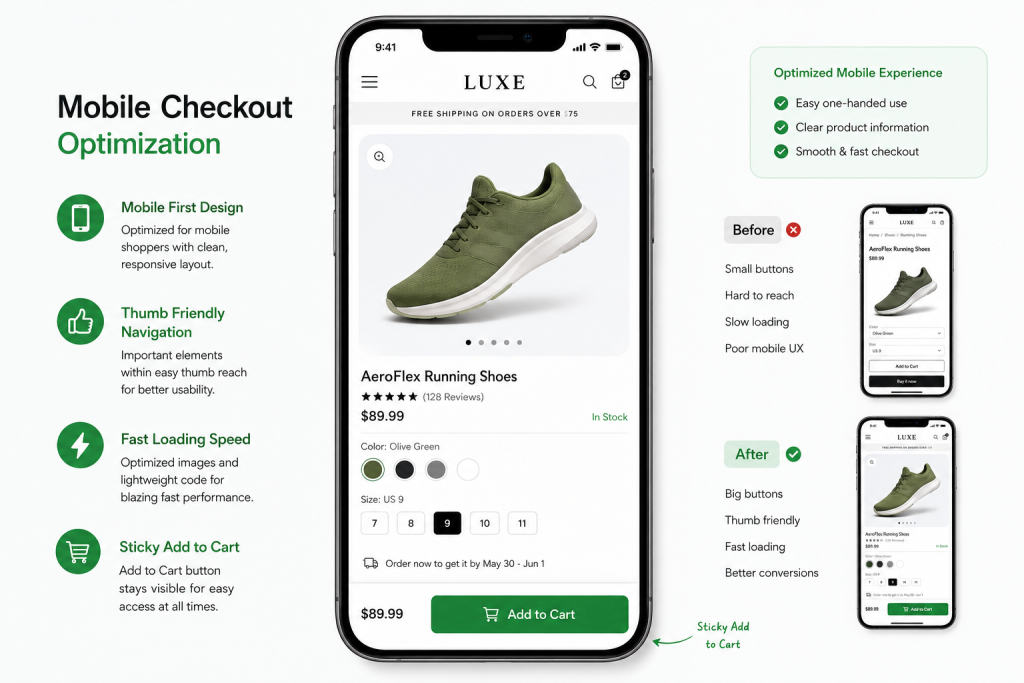
Over 70% of Shopify traffic now comes from mobile devices. If your checkout isn’t “thumb-friendly,” you are losing money. Focus on Shopify mobile conversion optimization by implementing:
- Sticky “Add to Cart” Buttons: Keep the CTA visible as the user scrolls.
- Mobile-First Design: Ensure buttons are large enough to tap easily and text is readable without zooming.
- Fast Loading: Mobile users are impatient. A 1-second delay can drop conversions by 7%.
3. Be Transparent About Shipping Costs
Surprise fees are the ultimate “mood killer” in e-commerce. Transparency builds the foundation of a sale.
- Shipping Calculators: Put a shipping estimator on the product page or the initial cart drawer.
- Free Shipping Thresholds: Use a header bar (e.g., “Spend $10 more for Free Shipping”) to encourage higher AOVs while removing the shipping cost barrier.
- No Hidden Fees: Ensure taxes are clearly calculated early in the process.
4. Add Multiple Payment Options
The way people pay is changing. If you only offer standard credit card entry, you’re missing out.
- Express Checkouts: Enable Shop Pay, PayPal, and Apple Pay. These allow users to buy in two clicks using saved biometric data.
- BNPL (Buy Now, Pay Later): Options like Klarna or Affirm reduce “sticker shock” for higher-priced items by breaking them into installments.
5. Build Trust Across the Checkout Journey
A shopper needs to feel safe before clicking “Pay Now.”
- Security Badges: Display SSL seals and trusted payment icons (Visa, Mastercard) near the checkout button.
- Social Proof: Mention your “30-day money-back guarantee” or show a small “4.9/5 stars from 2,000+ customers” snippet on the cart page.
- Clear Policies: Link to your return and shipping policies so they can be accessed without leaving the checkout flow.
6. Improve Shopify Store Speed
As a Shopify CRO expert will tell you, speed is a feature. A sluggish site creates a sense of unreliability.
- Image Compression: Use apps or manual tools to ensure product images are under 200kb.
- App Audit: Delete any Shopify apps you aren’t actively using; their scripts often bloat your code.
- Optimize Core Web Vitals: Focus on “Largest Contentful Paint” to ensure your checkout page renders instantly.
7. Use High-Converting Product Pages
The checkout starts on the product page. If the user isn’t 100% convinced there, they’ll abandon the cart later. Use Shopify product page design best practices:
- High-Quality Media: Use video or 3D models to show the product in action.
- Concise FAQs: Answer common questions right next to the “Add to Cart” button to resolve doubts immediately.
8. Create a Better Shopify Homepage Experience
Your homepage sets the tone. If it’s cluttered, users enter the funnel with a “low trust” mindset. Improve your Shopify homepage design by:
- Clear Value Prop: Tell them why to buy from you within 3 seconds of landing.
- Easy Navigation: Ensure users can find exactly what they want without endless clicking.
9. Recover Lost Sales With Abandoned Cart Emails
Sometimes, life just gets in the way—a phone call or a crying baby can interrupt a sale. This is where Shopify abandoned cart recovery shines.
- The 3-Step Sequence: Send the first email 1 hour after abandonment, the second at 24 hours, and a final “last chance” discount at 48 hours.
- Personalization: Include the specific product names and images they left behind to trigger visual memory.
10. Use Exit-Intent Popups Strategically
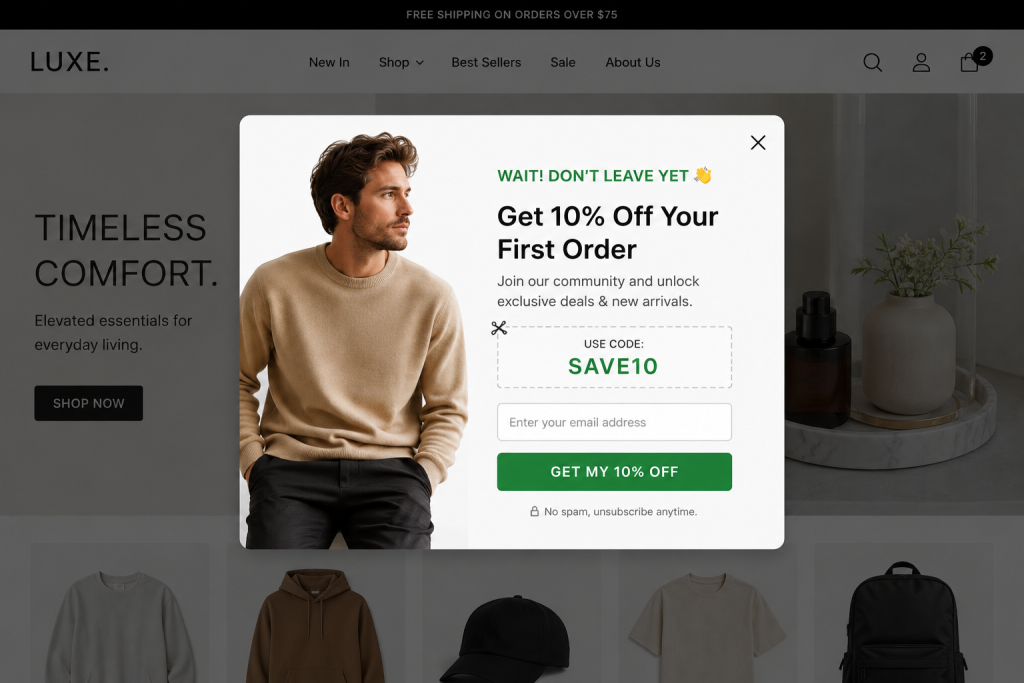
Catch them before they close the tab. An exit-intent popup triggered when a mouse moves toward the “X” button can save a sale.
- The “Wait!” Offer: Provide a one-time 10% discount code in exchange for completing the order right now.
- Email Capture: Even if they don’t buy, getting their email allows you to market to them later.
11. Add Live Chat or Instant Support
Hesitation kills conversions. If a buyer has a question about sizing or shipping, they won’t wait for an email reply.
- AI Chatbots: Use Shopify-integrated bots to answer “Where is my order?” or “Does this run true to size?” instantly.
- Live Support: Having a human available during peak hours can drastically reduce abandonment.
12. Use Social Proof to Increase Confidence
People buy what other people are buying.
- User-Generated Content (UGC): Display photos of real customers using your products in the cart or on the checkout sidebar.
- Live Sales Notifications: Small popups showing “Sarah from New York just bought this!” create a “herd mentality” that validates the shopper’s choice.
13. Create Urgency Without Being Pushy
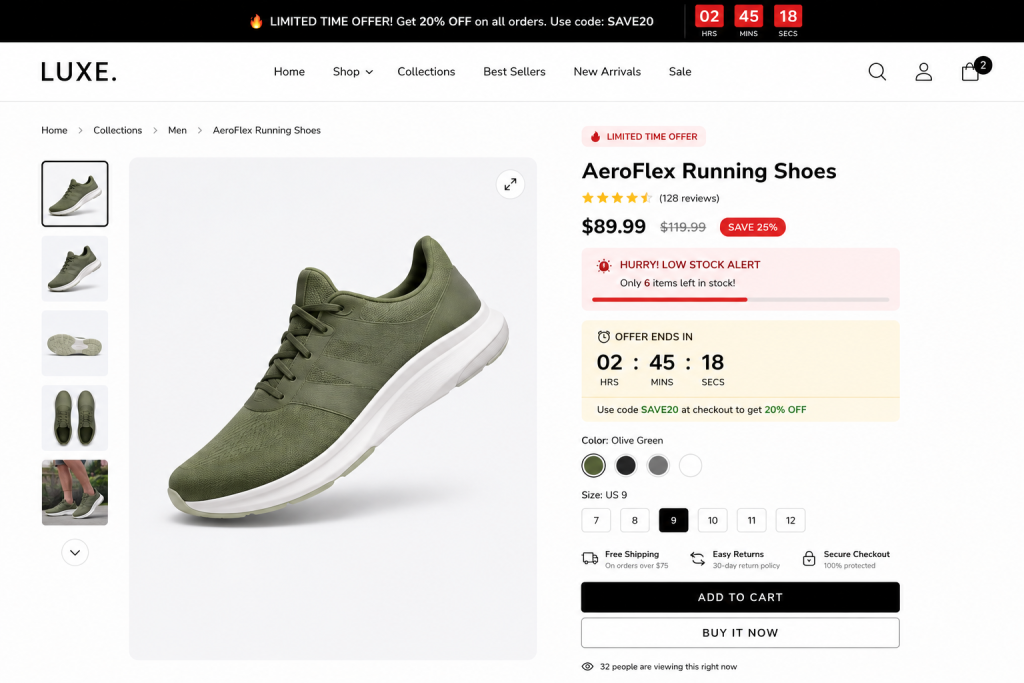
Psychological triggers can nudge a “maybe” into a “yes.”
- Low Stock Alerts: “Only 3 left in stock!” creates a fear of missing out (FOMO).
- Reservation Timers: “We’ve reserved your items for 10:00 minutes” creates a gentle ticking clock that encourages completion.
14. Retarget Abandoning Visitors
Most people need 7+ touchpoints before buying. If they leave your Shopify store, follow them (politely) with ads.
- Dynamic Retargeting: Use Meta or Google ads to show the exact product the user left in their cart.
- Omnichannel Recovery: Combine retargeting ads with your email recovery flow for maximum impact.
15. Continuously Test and Optimize Your Checkout
What works for one store might not work for another. The only way to truly solve Shopify conversion problems is through data.
- A/B Testing: Test different CTA button colors or copy (e.g., “Buy Now” vs. “Complete My Order”).
- Heatmaps: Use tools like Hotjar to see where users are clicking—and where they are getting stuck.
Mistakes to Avoid
Even with the best intentions, merchants often fall into these traps:
- Too Many Distractions: Removing the header and footer during checkout keeps the user focused on one thing: finishing the purchase.
- Slow-Loading Apps: Every “upsell” app you add to the cart page adds milliseconds of load time. Be selective.
- Vague Return Policies: If users can’t find how to return an item, they won’t risk the initial purchase.
Turn More Abandoned Carts Into Sales
In reality, cart abandonment is not a one-and-done problem, it’s an ongoing journey to continually improve the user experience. Optimizing for mobile, being 100% transparent with your pricing, and establishing trust is key to boosting your conversion rate and recovering lost revenue.
Check out your own checkout on your cell phone today. If you think it’s frustrating, your customers do too. Making small incremental CRO improvements can make the biggest impact on your profits.