

Wouldn’t you want to spend thousands of dollars driving traffic to your site and have them leave without making a sale or sign-up? A scenario thousands of business owners can relate to is frustrating. This is where optimization of a website comes in handy. You cannot guess what your audience is interested in and want, you must use data.
With regards to making data-driven decisions that really drive conversions, these are the two methods that reign supreme in the industry, split testing and multivariate testing.
When deciding between split testing vs multivariate testing, it can seem like an overwhelming decision to make if you don’t understand the differences. If you test two completely different pages, or is a combination of smaller elements on one page better? Here you will learn both methods, their advantages and disadvantages, and which one is right for you in your current business objectives and traffic.
Understanding Website Testing in CRO
Let’s first take a step back and examine the Conversion Rate Optimization (CRO). CRO is simply the systematic method of growing the conversion rate of website visitors to take a certain action, like purchasing a product, filling out a form, clicking a button, etc.
The methods used to test websites are the tools that enable CRO. Testing, rather than relying on the “gut feel” or copying what a competitor is doing, lets you use real user data to guide your design and copy decisions.
Testing is essential for:
- Improving User Experience (UX): It helps you identify where users get stuck, confused, or frustrated.
- Boosting Sales and Leads: Small tweaks to a page can yield massive lifts in revenue.
- Reducing Guesswork: It ends internal team debates about which headline or image looks “better” by letting the audience decide.
Pro Tip: Improving your conversion rate often requires a holistic approach. Many successful e-commerce businesses frequently combine these core testing methods with specialized shopify cro to optimize their checkout funnels and maximize store performance.
What Is Split Testing?
Definition of Split Testing
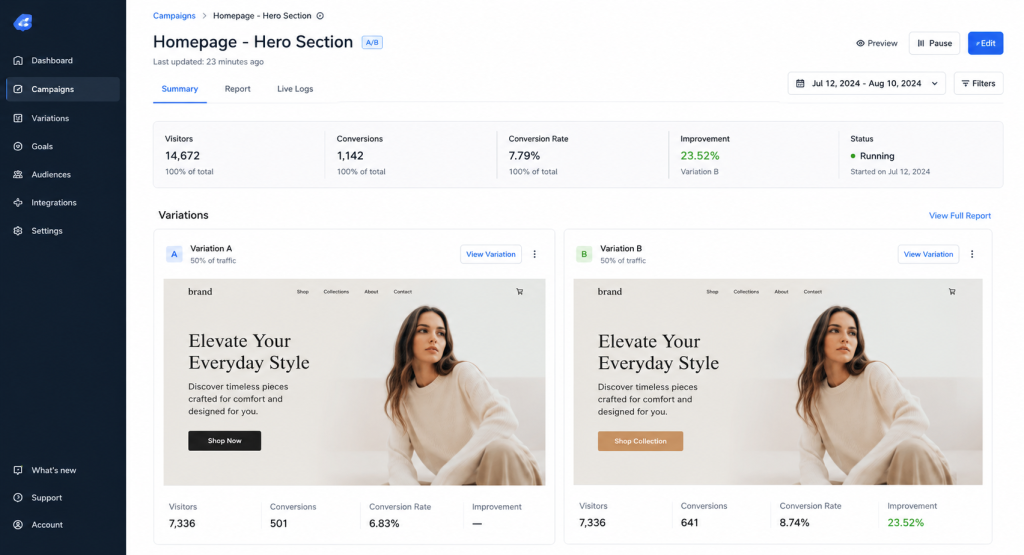
Split testing, known as A/B testing, is the process of comparing two versions of a webpage with each other to see which one performs better.
The concept is beautifully simple, you take your existing webpage (Version A, the Control) and create a modified version of it (Version B, the Variation). Your website traffic is then split evenly (50% to Version A and 50% to Version B) over a set period. The version that drives the most conversions wins.
Common Elements Tested in Split Testing
Because split testing compares two distinct pages, you can test single elements or entirely different layouts. Common elements include:
- Headlines: Testing a benefit-driven headline against a curiosity-driven one.
- CTA Buttons: Changing the color, text (e.g., “Buy Now” vs. “Get Started”), or placement.
- Product Pages: Experimenting with different layouts for product specifications.
- Pricing Layouts: Comparing a multi-tier grid against a single-focus pricing model.
- Images: Swapping a generic stock photo for an authentic shot of someone using your product.
Advantages of Split Testing
- Easier to Set Up: Most basic testing tools allow you to launch an A/B test in a matter of minutes.
- Faster Results: Because you are only splitting traffic between two variants, you reach statistical significance much quicker.
- Best for Smaller Traffic Websites: You don’t need millions of visitors to get clear, reliable data.
- Clear Winner Identification: At the end of the test, you get a definitive answer on which page layout drove more revenue or clicks.
Limitations of Split Testing
- Tests Only One Major Variation at a Time: If you change the headline, the button color, and the hero image all at once in Version B, you won’t know which specific change caused the conversion lift.
- Limited Insights into Element Interactions: It cannot tell you how a specific headline performs when paired with a specific button color.
To maximize your success with this method, make sure you are actively avoiding common A/B testing mistakes like changing variables mid-test or peeking at results too early.
What Is Multivariate Testing?
Definition of Multivariate Testing
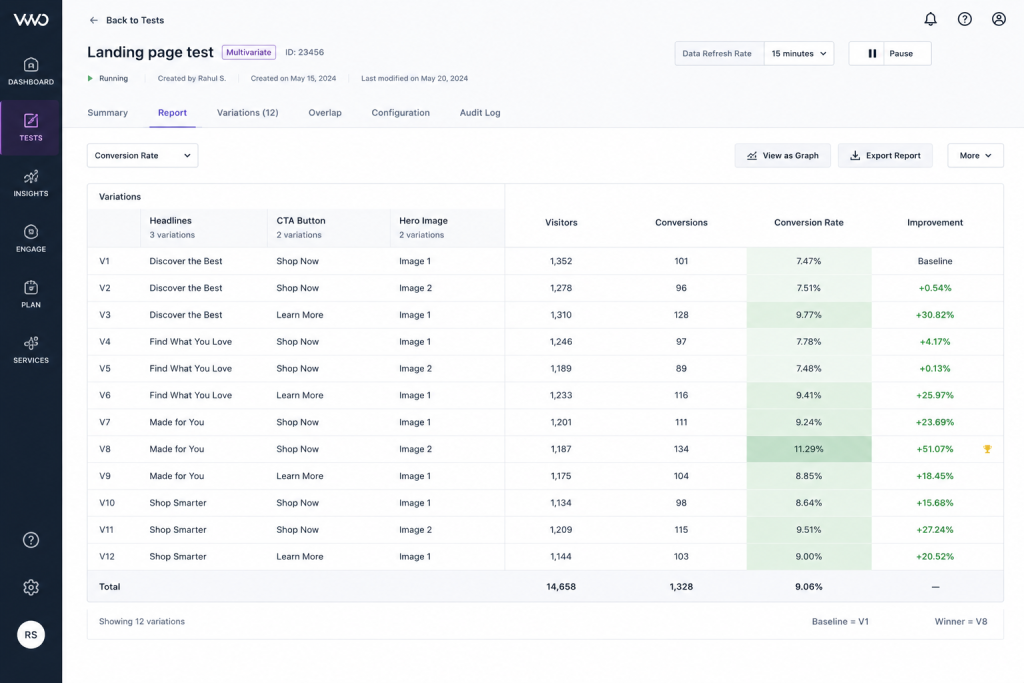
Multivariate testing (MVT) takes optimization a step further. Instead of testing Version A against Version B, multivariate testing for conversion optimization involves modifying multiple elements on the same page simultaneously to see which specific combination yields the highest conversion rate.
If you decide to test three different headlines and two different call-to-action (CTA) colors at the same time, an MVT tool automatically generates all possible combinations and distributes traffic equally among them.
Example of Multivariate Testing
Let’s look at a practical e-commerce example. Suppose you want to test the following variables on a product page:
- Headline: 2 variations (Headline 1, Headline 2)
- CTA Color: 2 variations (Green Button, Blue Button)
- Product Image: 2 variations (Image A, Image B)
Instead of running multiple separate A/B tests, a multivariate test creates $2 \times 2 \times 2 = 8$ distinct combinations simultaneously. The traffic is split equally across all eight combinations to determine exactly which blend of headline, color, and imagery triggers the most purchases.
Advantages of Multivariate Testing
- Deeper User Behavior Insights: It maps out exactly how different elements interact with one another.
- Identifies Best-Performing Element Combinations: You might find that Headline 2 performs terribly on its own, but performs exceptionally well when paired with the Blue Button.
Advanced Optimization: Perfect for squeezing the maximum possible performance out of an already high-performing page.
Limitations of Multivariate Testing
- Requires High Website Traffic: Because traffic is split across numerous combinations, you need a massive amount of monthly visitors to get statistically reliable results.
- More Complex Setup: Designing, implementing, and QA-testing several moving parts requires technical expertise.
- Longer Testing Periods: It can take weeks or even months to collect enough data for every single combination.
- Difficult Data Interpretation: Analyzing the matrix of results requires a solid understanding of data and analytics.
Split Testing vs Multivariate Testing: Key Differences
It is very important to get the basic idea of the difference between split testing and multivariate testing before you invest time and money into your marketing strategy. Let’s examine how they compare with one another on five key indicators.
Testing Structure
Split testing tests two completely different web pages (typically with drastically different designs or concepts). Multivariate testing plays with the small details and specifics of one web page to discover the most effective mix of copy and design components.
Traffic Requirements
It’s the one deciding factor for most businesses. Split testing is also easy to manage for traffic efforts that are low to medium, as it is just splitting the traffic into two or three buckets. However, if you have 8 or 16 combinations and you are trying to draw a definite conclusion, you’ll need a huge sample size, and multivariate testing will require a great amount of volume.
Complexity Level
Split testing is very easy to do and manage for beginners. Most visual editors allow you to drag, drop and manipulate text without any coding skills whatsoever. Depending on the amount of the work involved, multivariate testing can be viewed as a more in-depth optimization process that demands careful planning, cross browser testing, and complex data tracking.
Speed of Results
Split testing provides super quick results due to the reduced need for traffic. The winner can be declared in 1-2 weeks. Multivariate testing offers more insights, but also requires a lot more time.
Accuracy and Insights
Split testing provides you with a general, macro level response: “Design B is superior to Design A.” Micro level learning is found in multivariate testing: “The Red Button with the headline 2 brings in 14% more conversions than all other combinations.”
Quick Comparison Matrix
Factor | Split Testing | Multivariate Testing |
Complexity | Low | High |
Traffic Requirement | Low-Medium | High |
Speed | Faster | Slower |
Insights | Basic (Macro-level) | Detailed (Micro-level) |
Best For | Beginners & Major Redesigns | Advanced CRO & Fine-tuning |
A/B Testing vs Multivariate Testing: Which One Is Better?
There is no definitive champion in the battle of A/B testing vs multivariate testing. The real question is: Which method is better for your website right now?
When Split Testing Is the Better Choice
- New Websites: When you don’t have enough traffic history to fuel a complex test.
- Low Traffic Stores: Ideal for startups or boutique brands that get under 30,000 visitors a month.
- Testing Major Design Changes: If you are changing the entire theme, navigation structure, or narrative arc of a landing page.
- Faster Campaign Optimization: When you need quick answers to hit short-term quarterly or seasonal sales goals.
When Multivariate Testing Works Best
- Established Websites: Websites that consistently pull in hundreds of thousands of monthly visitors.
- High Traffic E-commerce Stores: Large brands looking to maximize marginal gains across high-intent pages.
- Optimizing Multiple Elements Together: When you are already confident in the page layout, but want to master the harmony between your text, imagery, and CTAs.
Real-World Use Cases
- E-commerce Product Pages: Brands often implement tailored A/B testing for shopify stores to test whether adding customer reviews above the fold boosts add-to-cart rates.
- SaaS Landing Pages: A software company might use multivariate testing to find the perfect mix of pricing tier highlights, testimonial placement, and trial button colors.
- Lead Generation Websites: A real estate site might test a short, 3-field contact form against a longer, multi-step interactive form to see which yields higher-quality leads.
How to Choose the Right Testing Method for Your Website
If you are at a crossroads, and you have to decide, just step back and take a look at your existing digital real estate and apply one of the four following criteria.
1. Evaluate Your Website Traffic
Calculating your sample size before you start writing your test copy. With only 2000 monthly visitors to your page, you get only 250 visitors per multivariate test variation in the test with 8 variations. The month or more would be needed to find a mathematically sound winner. Only use split testing if you have a substantial amount of traffic.
2. Define Your Optimization Goals
Do you want a complete overhaul, or just a glitzed up old favourite? When you are looking to make a significant lift in your conversion with a completely different value proposition, you should conduct a split test. If your page is converting well at 4%, and you’re looking for a more subtle tweak that will push your conversion rate up to 4.5%, then it is time to try multivariate testing.
3. Consider Your Resources
Be realistic about the skill level, time and budget of your team. Multivariate tests require detailed attention, a high level of engineering/design time and sophisticated analytics software. Split testing can be easily handled by a single growth marketer or founder.
4. Start Simple Before Scaling
The first principle of CRO is to crawl before you walk and walk before you run. Always learn a clean step-by-step A/B testing process before scaling up to more complex experiments that have multiple variables.
Best Practices for Successful Website Testing
Regardless of which website optimization testing methods you deploy, adhering to core mathematical and scientific principles keeps your data clean.
Test One Goal at a Time
Don’t try to optimize for newsletter sign-ups, product purchases, and social media shares all in the same experiment. Focus on a single primary goal (like completing a checkout) to avoid muddying your data.
Run Tests Long Enough
A common trap is stopping a test the moment one variation takes the lead. You must run tests long enough to achieve statistical significance (usually 95% or higher) and ensure your test captures full business cycles (running for at least 2 to 4 full weeks to account for weekday vs. weekend buying habits).
Track Meaningful Metrics
Don’t get distracted by vanity metrics. Keep your eyes glued to indicators that directly impact your bottom line:
- Click-Through Rate (CTR): Are they moving to the next step?
- Conversion Rate: Are they completing the ultimate goal?
- Bounce Rate: Is the new variation driving people away immediately?
- Revenue per Visitor (RPV): Is the variation encouraging people to spend more money per transaction?
Avoid Common Testing Errors
Avoid ending tests prematurely just because you got an early spike in conversions. Don’t forget to segment your data to see how mobile users behave compared to desktop users—a variation that wins on desktop might completely break on a mobile screen!
Tool Tip: If your site runs on e-commerce infrastructure, using the best A/B testing tools for Shopify ensures your data tracking integrates seamlessly with your backend revenue reports without slowing down your site speed.
Best Tools for Split Testing and Multivariate Testing
To execute these tests seamlessly, you need software that matches your skill level and infrastructure.
Popular Testing Tools
- Optimizely: The industry gold standard for enterprise companies looking for robust, server-side split and multivariate testing capabilities.
- VWO (Visual Website Optimizer): An incredible, all-in-one CRO platform featuring easy-to-use visual editors, heatmaps, and session recordings alongside testing features.
- Adobe Target: A highly powerful, AI-driven optimization tool best suited for massive companies deeply embedded in the Adobe ecosystem.
- Convert: A privacy-friendly, blazingly fast alternative favored by mid-market brands for its exceptional customer support and clean integration capabilities.
Mistakes Businesses Make in Website Testing
Even with the best tools, experiments can fail if your strategy is flawed. Avoid these common pitfalls:
- No Clear Hypothesis: Avoid testing randomly. State a scientific prediction first (e.g., “Moving the mobile CTA above the fold will lift clicks by 10%”).
- Too Many Changes: Changing multiple elements at once in a standard split test hides what actually caused the results.
- Ignoring Intent: High clicks don’t matter if users bounce immediately because they feel tricked by gimmicky design.
- No Documentation: Archive every win and loss. Failed tests are highly valuable for learning what your audience dislikes.
Need Help? If your team is struggling to uncover why conversions are stagnant or you don’t know where to start testing, investing in a professional CRO audit service can pinpoint hidden bottlenecks in your funnel instantly.
Final Verdict
On a closer look at split testing vs multivariate testing, it’s obvious that both strategies have their own distinct and valuable role in a marketer’s arsenal. Here there is no one right answer.
The decision is just a matter of a realistic evaluation of what traffic you’re able to send, your overall business objectives, the complexity of the layout, and your team’s resources.
- Go with Split Testing When your website is young or growing, you’re considering sweeping redesigns, or you need quick and actionable information.
- Go with Multivariate Testing When you are running a successful, high-traffic digital ecosystem and are looking to find out the ultimate mathematical equations for your on page elements, then you should check out this solution.
Optimization is an ongoing process – not a quick one. If you’re just beginning: Do a simple split test this week. Gather data, understand your users, and build your tests as your traffic and income increases. The only real failure is one you don’t even bother to take.